Teleradiology
Send each study to the right reader, wherever they are.
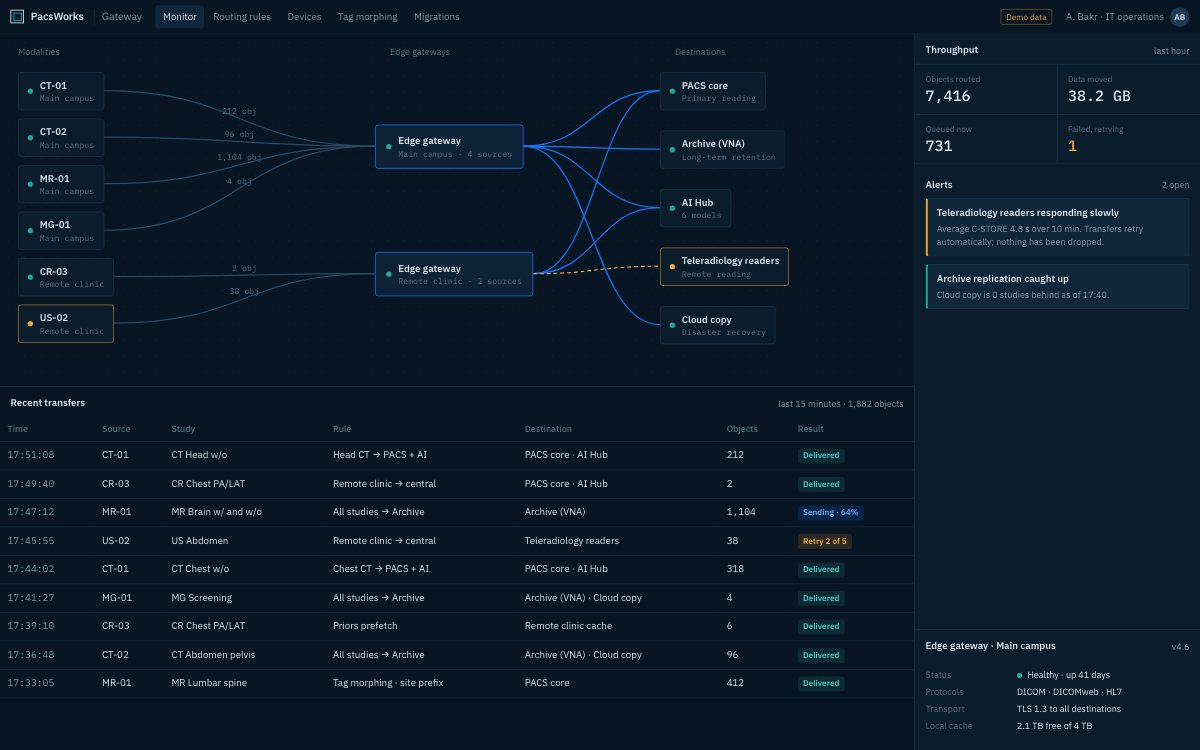
Every client site, gateway, queue and destination on one monitor. Screens show demo data and synthetic images.
The challenge
Teleradiology depends on moving studies quickly and reliably between sites that were never designed to work together.
A teleradiology service reads for hospitals and clinics it does not run. Each client has its own scanners, PACS, network and IT policy, and the service has to fit in with all of them.
Studies have to leave each client site quickly over links of very different quality, arrive complete, reach a reader with the right subspecialty and come back as a report in the client’s own system. Every manual step is a delay, and every silent failure is a missed case.
PacsWorks puts a gateway at each client site and a single worklist at the centre. Transfers are queued, retried and visible, priors are fetched before the reader opens the case, and reports go back the way each client needs them.
How it fits together.
Each client keeps its own systems. A gateway at the client site handles the link; the centre sees one worklist across every client.
A night-time CT from a client hospital.
- Client site
Acquired
The scanner or local PACS sends the study to the gateway installed at the client.
- Gateway
Queued and sent
Transfer is tuned to that site’s link and retried on failure, with progress visible centrally.
- Archive
Priors fetched
Relevant priors for the patient are pulled to the reading site before the case opens.
- Worklist
Assigned
The study is assigned by priority, subspecialty and the client it belongs to.
- Client RIS
Reported
The signed report returns into the client’s own RIS over HL7.
What changes.
Routing across client sites
Gateways at each referring site send studies to the central worklist as soon as they are acquired.
Diagnostic access from anywhere
Readers open full-fidelity studies in the browser viewer or on a workstation.
Priors fetched ahead
Prior studies are prefetched to the reading site before the case is opened.
One central archive
Every study from every client site is retained in one archive.
Tuned to each link
Transfer queues and compression are configured per site to suit its bandwidth.
Visible transfers
Every transfer, queue and destination is shown on the gateway monitor.
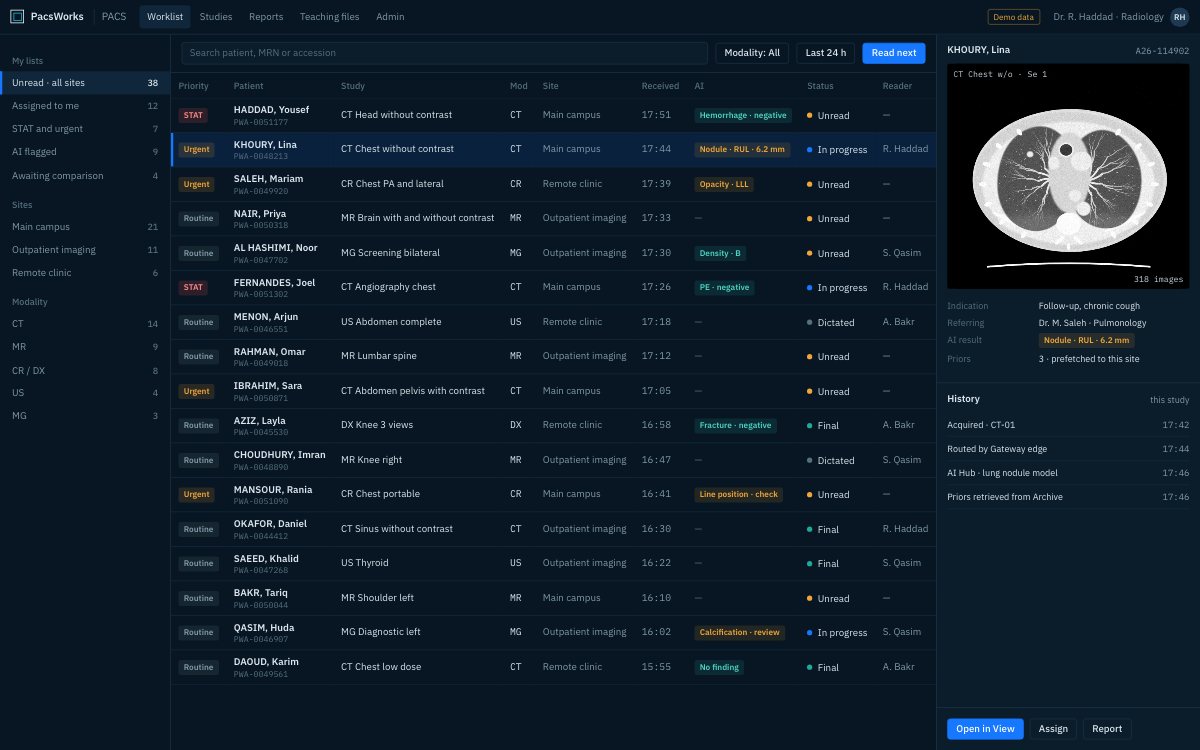
One worklist across every client.
Readers see one list for every client they cover, filtered by subspecialty and priority. Studies carry the client they came from, so reporting templates and return routes follow automatically.
- Assignment by subspecialty and priority
- Client-specific reporting and return routes
- Readers see only the clients they cover
Full-fidelity reading from anywhere.
Readers open diagnostic-quality studies in the browser viewer or on a workstation at home or in a reading hub. Large CT and MR series stream progressively, so the first images appear while the rest arrives.
- Progressive loading for large series
- Priors registered side by side
- Measurements, MPR and hanging protocols
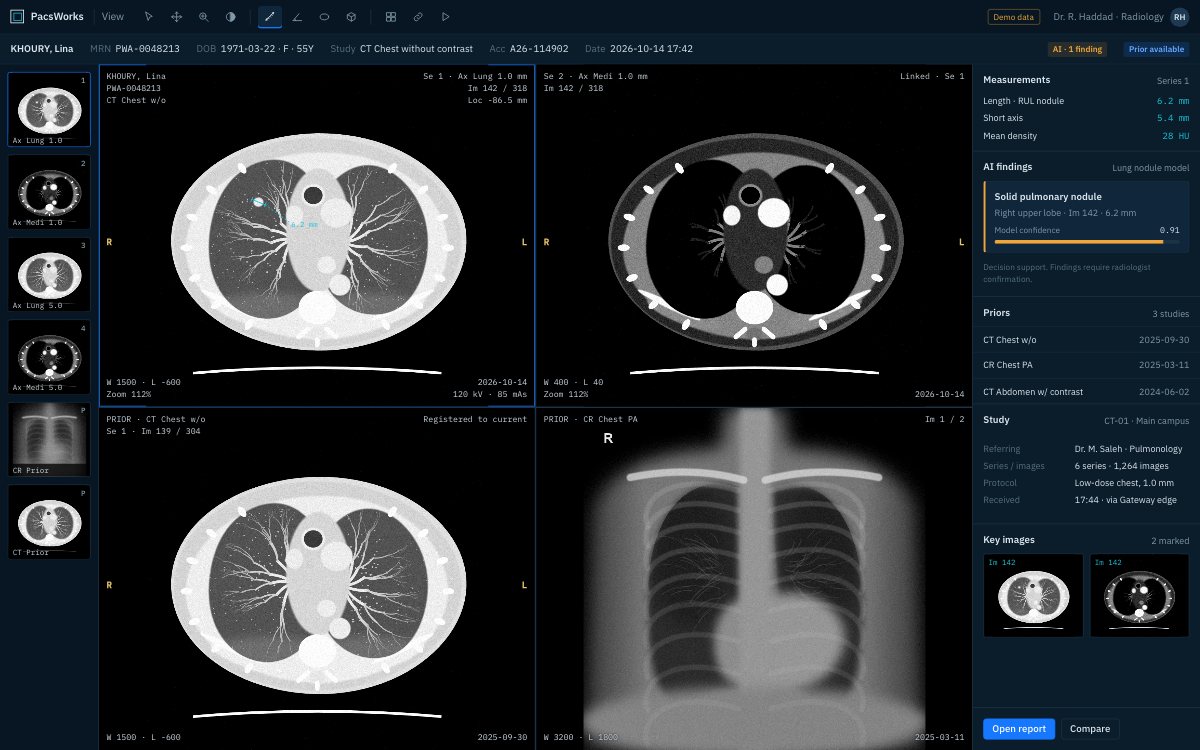
Screens show demo data and synthetic images.
What each team gets.
Readers
One worklist for every client, priors already loaded, from any location.
Client hospitals
No change to their own PACS; reports arrive in their RIS.
Operations team
Every transfer, queue and failure visible on one monitor, per client.
Service owners
New clients onboarded by installing a gateway, not by building a new integration each time.
How a rollout is phased.
No single cut-over. Each phase runs alongside what is already in service.
Onboard the first client
A gateway goes in at the client site and routing is agreed with their IT team.
Set up readers
Readers, subspecialties and access per client are configured centrally.
Connect report return
HL7 results or portal delivery are tested end to end with the client.
Add clients
Each new client repeats the same steps against the same central platform.
Questions we hear.
Do clients need to change their PACS?
No. The gateway receives studies from the client’s scanners or existing PACS and sends reports back into their RIS. Their internal workflow stays as it is.
What happens when a client link drops?
Studies wait in the gateway queue and are retried when the link returns. The queue is visible centrally, so the operations team sees a delay before a client calls about it.
How are reports returned?
Over HL7 into the client’s RIS, through a link in the client portal, or both, configured per client.
Is each client’s data kept separate?
Every study carries the client it came from. Access is role-based, so readers and client users see only the clients they are entitled to.
Tell us about your imaging environment.
What you run today, where the bottlenecks are and how you expect to grow. We will come back with an architecture, not a product pitch.