PacsWorks View
Diagnostic reading in the browser or on the workstation.
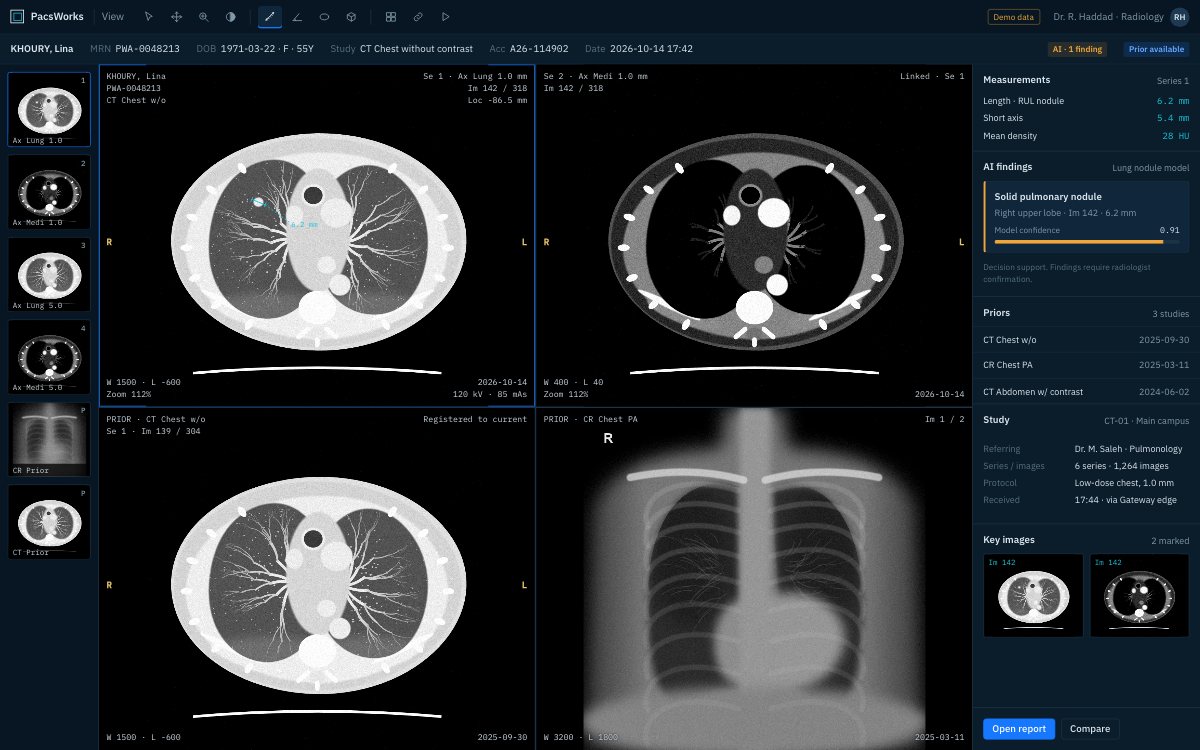
Screens show demo data and synthetic images.
What it does
PacsWorks View is the viewer radiologists read in and clinicians review in. The same viewer runs on a diagnostic workstation and in a browser, with the tools each role needs.
Fast on large studies
Progressive loading puts the first images on screen while the rest of a large CT or MR series streams in.
Diagnostic tools
Measurements, MPR, window presets, linked scrolling, cine and hanging protocols by modality and body part.
Prior comparison
Current and prior studies open side by side, registered to the same anatomy.
Browser access for clinicians
Referring doctors view images and final reports in a browser on desktop, tablet or phone, with nothing to install.
Role-based views
Radiologists, clinicians and external referrers each see the tools and studies their role allows.
AI overlays
Heatmaps, outlines and measurements from AI models appear on the image for the radiologist to confirm or reject.
Technical profile
| Viewer modes | Diagnostic workstation and browser |
|---|---|
| Modalities | CT, MR, CR, DX, US, MG, PET and other DICOM modalities |
| Access | Desktop, tablet and phone browsers |
| Integration | PACS, VNA, RIS, EMR/EHR and AI services |
Tell us about your imaging environment.
What you run today, where the bottlenecks are and how you expect to grow. We will come back with an architecture, not a product pitch.