Imaging only works when systems can exchange context.
Standards-based connections between scanners, PACS, archives, RIS, EMR, portals and AI services.
The standards we speak.
Every connection PacsWorks makes uses a published standard, so each system around it stays replaceable.
DICOM® is the registered trademark of the National Electrical Manufacturers Association. HL7® and FHIR® are registered trademarks of Health Level Seven International. IHE® is a registered trademark of IHE International. Emblems shown are PacsWorks illustrations, not the standards bodies’ logos.
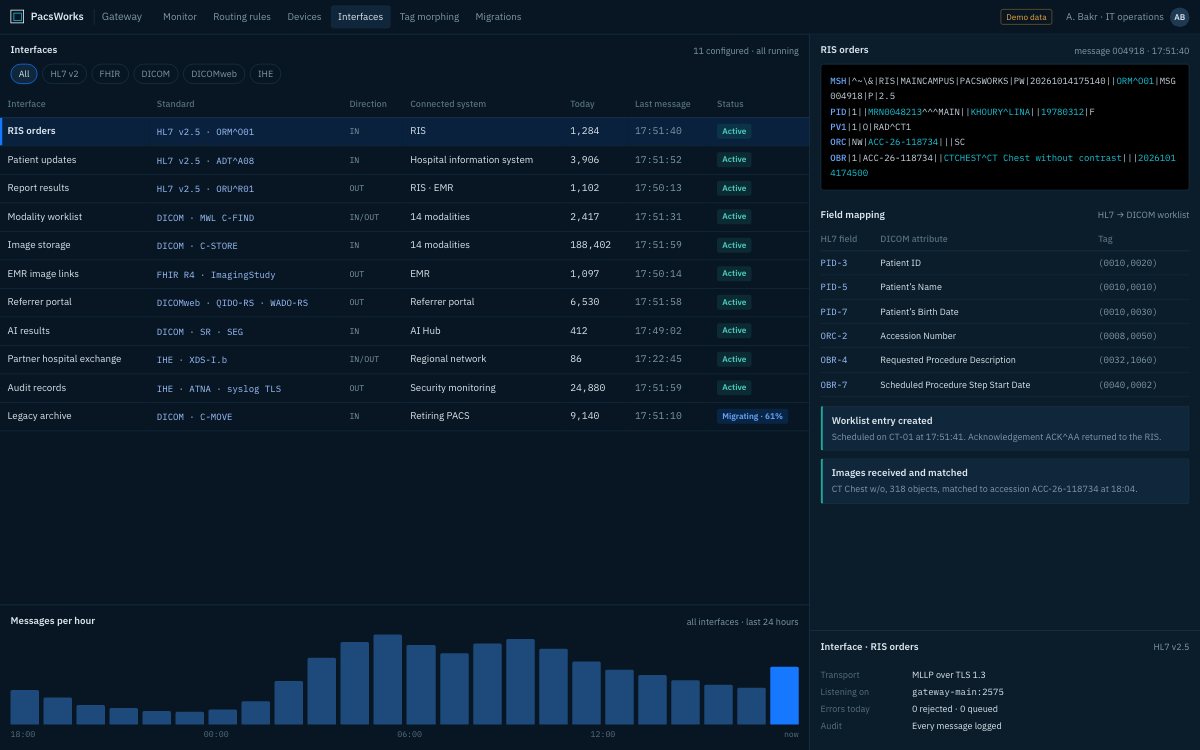
Every interface, standard and message in one place, with HL7 orders mapped to DICOM worklist fields. Screens show demo data and synthetic images.
Why standards, not custom interfaces.
A hospital’s imaging estate outlives most of the products in it. Scanners are replaced every few years, a RIS changes with a new contract, an EMR is upgraded, and AI applications arrive and leave. If each connection is a custom interface, every change becomes a project.
PacsWorks connects through published standards: DICOM and DICOMweb for images, HL7 v2 and FHIR for orders, results and patient context, and IHE profiles for how those standards fit together across vendors and organisations. Swapping one system means pointing a standard interface at the new one, not rebuilding the integration.
Where real systems deviate from the standard, as they often do, the gateway absorbs the difference through field mapping and tag morphing, so the rest of the estate sees clean data.
Systems we connect to.
Scanners
CT, MR, X-ray, ultrasound, mammography, PET and other DICOM modalities.
RIS
Orders in, report status and results out.
EMR and HIS
Patient context in, image links and reports in the clinical record.
Other PACS
Existing systems kept running during migration, then retired.
Archives and VNAs
Studies migrated or queried in place.
AI applications
Third-party imaging AI connected through AI Hub.
Portals
Referrer and patient access to images and reports.
Health information exchanges
Image sharing between organisations.
How the connections fit together.
Each arrow is a standard interface. PacsWorks sits in the middle, mapping and routing between them.
From order to report: the messages behind one study.
Six standard messages carry a study from the order to the patient’s record, with no retyping in between.
- RIS
Order placed
HL7 v2 ORMThe RIS sends the order and PacsWorks creates the expected study with its accession number.
- Scanner
Worklist
DICOM MWLThe scanner reads patient details and accession number from the modality worklist.
- Scanner
Images stored
DICOM C-STOREImages arrive at the gateway and are matched to the order.
- AI Hub
AI results
DICOM SR, SEGFindings return as DICOM objects stored with the study.
- Radiologist
Report
HL7 v2 ORUThe signed report goes back to the RIS and on to the EMR.
- EMR
Image link
FHIR, DICOMwebThe patient record shows the study and opens it in the browser viewer.
Standards in detail
| Standard | Connects | What we use |
|---|---|---|
| DICOM | Every scanner and image system | Storage (C-STORE), query and retrieve (C-FIND, C-MOVE, C-GET), modality worklist, structured reports and segmentations. |
| DICOMweb | Web viewers, portals and modern apps | QIDO-RS to search, WADO-RS to retrieve and STOW-RS to store, over HTTPS. |
| HL7 v2 | RIS and hospital information systems | Orders (ORM/OMI), results (ORU) and patient updates (ADT), over MLLP with TLS. |
| FHIR | EMRs and health platforms | ImagingStudy, DiagnosticReport and Patient resources through REST APIs. |
| IHE profiles | Multi-vendor and cross-organisation workflows | Scheduled Workflow, cross-enterprise image sharing (XDS-I.b), consistent time and audit (ATNA). |
Clean data, whatever the source.
Real scanners and systems rarely fill every field the same way. The gateway rewrites DICOM tags, prefixes identifiers per site and maps HL7 fields to DICOM attributes on the way in, so the archive holds consistent, searchable data.
- Tag morphing per scanner or site
- Identifier prefixes for multi-site estates
- HL7-to-DICOM field mapping
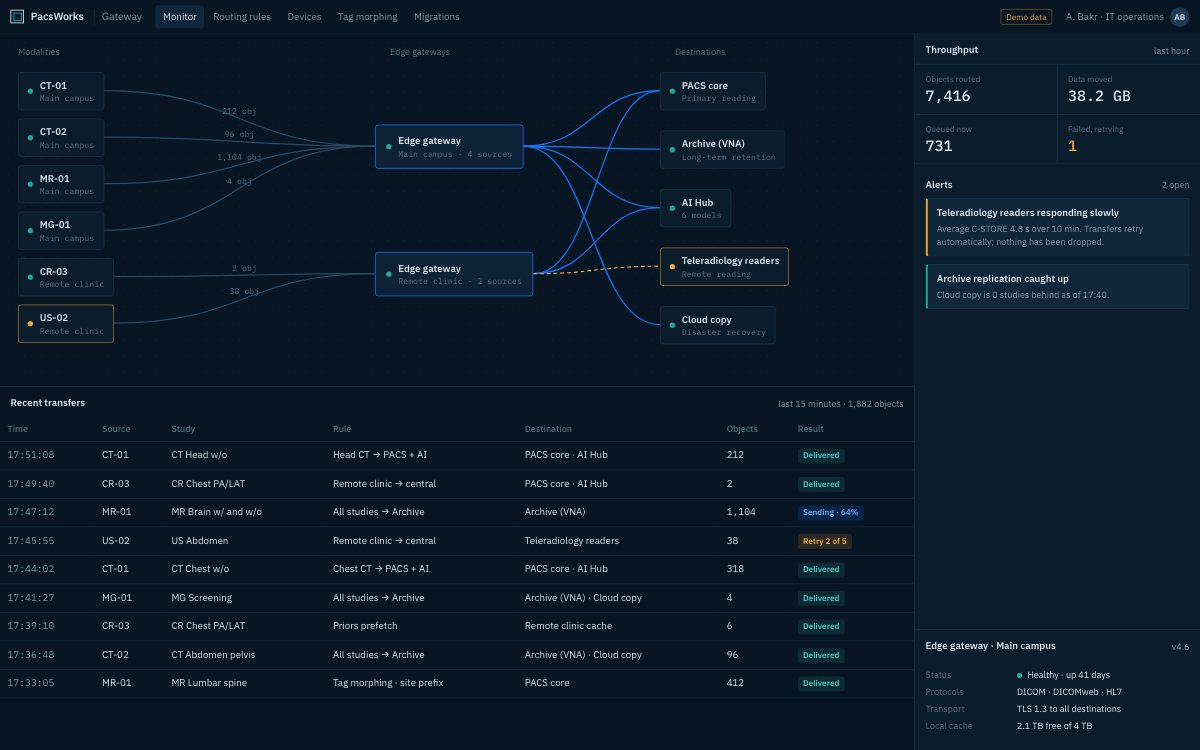
Screens show demo data and synthetic images.
How an integration project runs.
Inventory
We list every system, the standard and version it speaks, and the data it needs to send or receive.
Mapping
Fields, identifiers and codes are mapped between systems and agreed with your teams.
Testing
Each interface is tested end to end against your own systems with test patients.
Go-live and monitoring
Interfaces go live in a planned order and are monitored message by message.
Questions we hear.
Do you need custom interfaces for our RIS or EMR?
Usually not. Most RIS and EMR systems speak HL7 v2 or FHIR, and PacsWorks maps their messages to DICOM through configuration. Where a system uses its own dialect, we adapt the field mapping rather than writing new code.
Can you connect scanners from different vendors?
Yes. Scanners send standard DICOM to the gateway. Where a scanner fills tags differently from the rest of the estate, tag morphing rewrites them on the way in.
How do you avoid duplicate or mismatched patients?
Orders arrive over HL7 and populate the modality worklist, so the scanner uses the order’s patient details and accession number. Patient updates and merges from the HIS are applied to stored studies.
How long does an integration take?
It depends on the number of systems and how standard they are. We scope each interface during design, then test it end to end against your own systems before go-live.
Tell us about your imaging environment.
What you run today, where the bottlenecks are and how you expect to grow. We will come back with an architecture, not a product pitch.