PacsWorks Gateway
Move images reliably between every system you run.
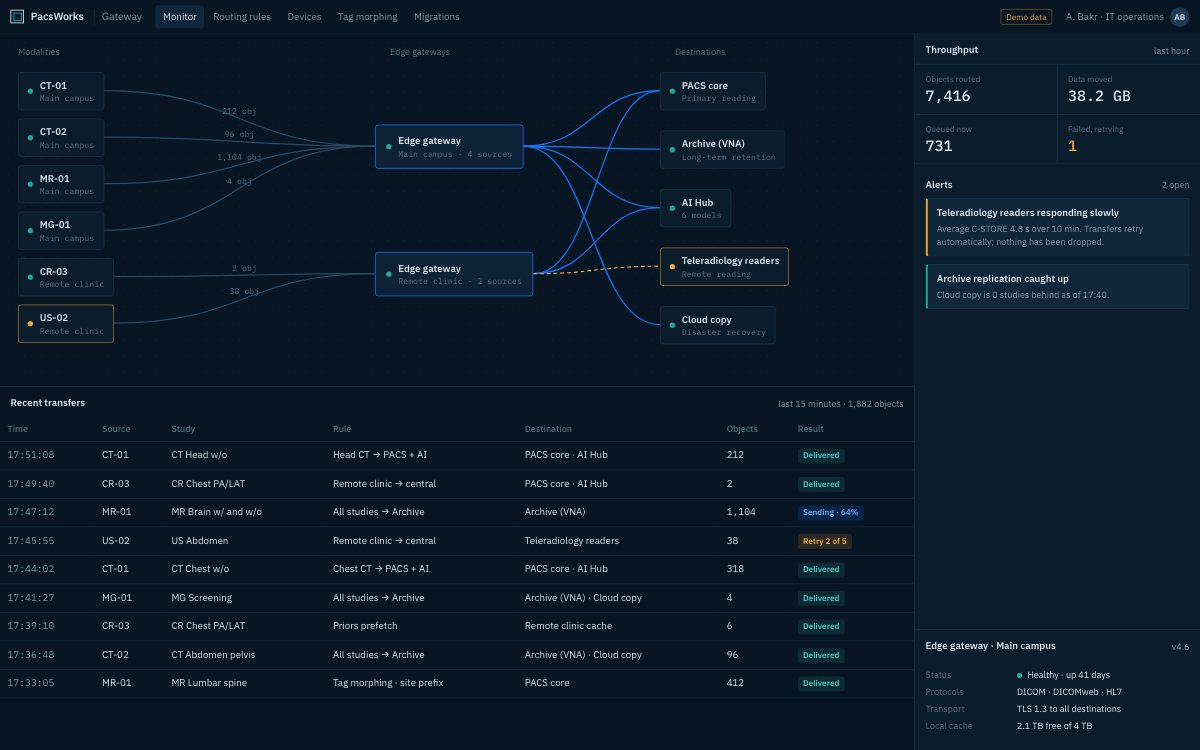
Screens show demo data and synthetic images.
What it does
PacsWorks Gateway sits between scanners, sites and destinations. It routes every study by rule, retries what fails and shows the whole flow on one monitor.
Rule-based routing
Forward, copy and route studies by modality, site, body part or any DICOM attribute.
Retries, not lost studies
Failed transfers are queued and retried automatically, and every failure is visible on the monitor.
Tag morphing
Rewrite selected DICOM tags so studies from one vendor are accepted cleanly by another.
DICOM to DICOMweb
Bridge traditional DICOM devices to modern web-based services.
Migration engine
Move and validate studies between legacy and new repositories.
Edge deployment
Install a gateway at each site, close to the scanners, and manage all of them centrally.
Technical profile
| DICOM | C-STORE, C-FIND, C-MOVE and modality worklist |
|---|---|
| Web | DICOMweb services |
| Enterprise | HL7 and FHIR through configured interfaces |
| Deployment | Virtual machine, appliance, container or hosted |
Tell us about your imaging environment.
What you run today, where the bottlenecks are and how you expect to grow. We will come back with an architecture, not a product pitch.